
How to select staff for the Booking
Each booking in HealthTrack has dedicated fields for recording who is booked, who is present, and any additional clinical staff involved in the appointment. Staff assignments affect diary visibility and, for multi-staff bookings, who appears in the Week/Person diary view.
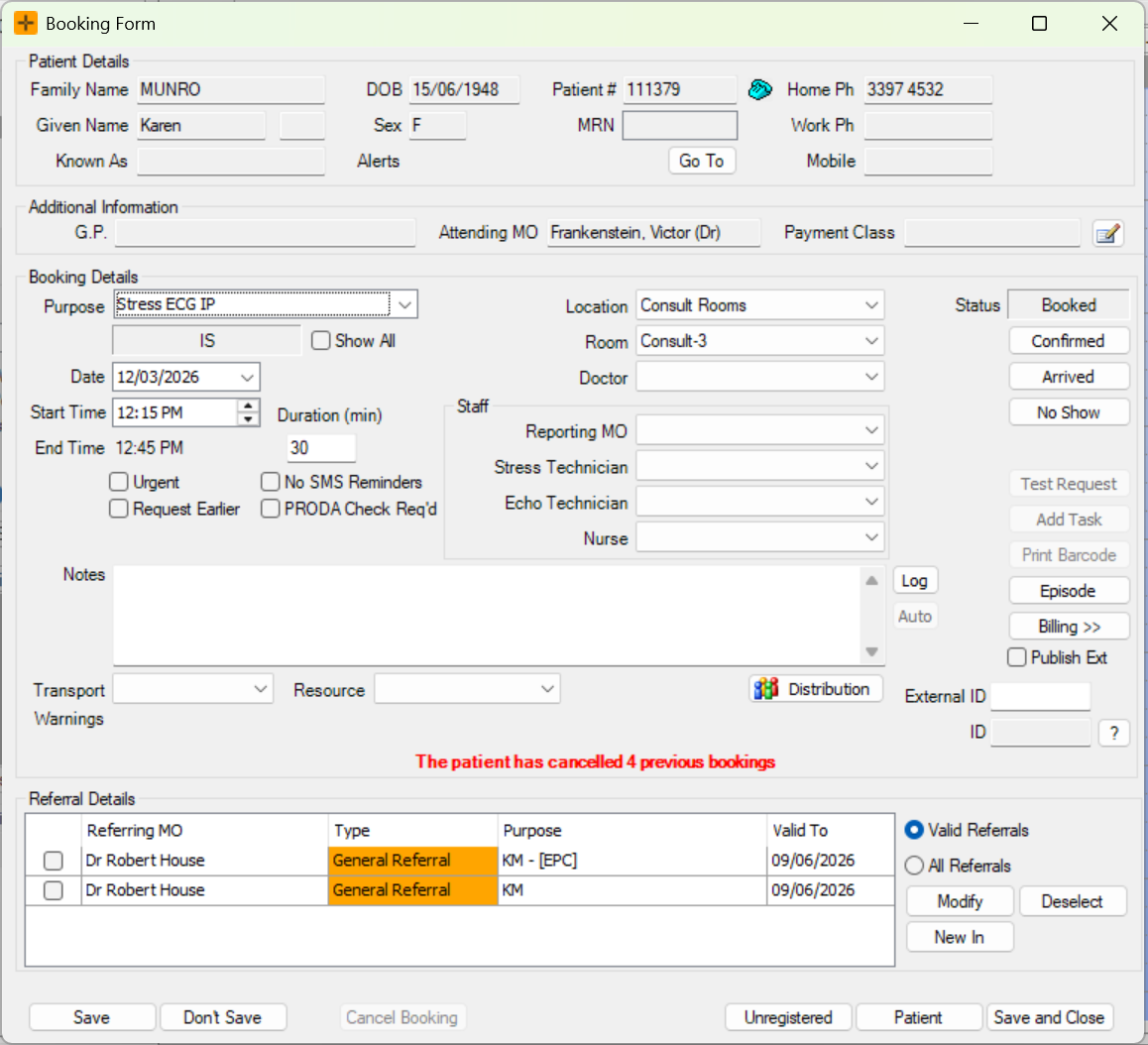
Select the Attending MO and Doctor
The Attending MO is the doctor responsible for the patient's care. The Doctor field records which doctor is assigned to this specific booking and is used for billing when the booking is closed.
- Double-click an existing booking in the Diary, or double-click a diary slot to create a new booking.
- In the Additional Information section, check the Attending MO field. This is typically pre-populated from the patient's Demographics screen.
- In the Booking Details section, select a doctor from the Doctor drop-down. If the booking was created from a template, this field may already be populated.
- Click Save and Close.
Assign staff to a booking
HealthTrack supports up to four additional staff members per booking - for example, a nurse, or technician. Each staff member added can see their appointments in their personal diary using the Week/Person view.
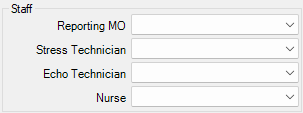
- In the Staff section of the Booking Form, select each staff member from the drop-down.
- Add up to four additional staff as required.
- Click Save and Close. The staff members are now associated with the booking and can view it in their personal diary.
Adding staff to a booking does not change who is billed. The Doctor remains the billing party when the booking is closed.
Staff you add are included in HealthTrack's clash check. If a staff member you add is unavailable at that time, you may see a clash warning. Depending on your practice's settings, this can be a warning you can continue past, or it can stop you saving until you choose someone else or a different time.
Why the staff boxes look different, or are missing
The number of staff boxes on the Booking Form, and the label on each one (for example Reporting MO, Stress Technician, Echo Technician or Nurse), is set up for your whole practice by an administrator. The same boxes appear on every booking, not only on certain booking types.
Because of this:
- If a box you expect is not there, the role for it has not been set up. This is a configuration setting, not a fault. Ask your practice administrator to set up the staff role you need.
- If the staff boxes seem to have disappeared, the staff roles have been changed or cleared in your practice settings rather than lost from the booking itself.
Configuring Staff Roles
The specific staff roles visible on the Booking Form, can be configured in Admin > Maintenance > System Settings.
Changes to System Settings should be treated with extreme caution. Any changes apply system-wide, take effect immediately, and impact each user at every location. Editing items can have knock-on effects that aren't obvious at the time.
- Go to System Settings.
- Search for BookingStaffRole in the 'Find property' search or scroll to the 'BookingForm' heading.

- Select Edit.
- Select the preferred staff role from the drop-down list.
- Select Save.
Staff field reference
| Field | Description |
|---|---|
| Attending MO | The medical officer responsible for the patient's care. |
| Doctor | The doctor assigned to this booking. Used for billing when the booking is closed. |
| Staff (1–4) | Up to four staff boxes for additional staff on the booking. Which boxes appear, and the label on each, are set up for your whole practice by an administrator and are the same on every booking. Examples include Reporting MO, Stress Technician, Echo Technician and Nurse. Each assigned staff member can view the booking in their Week/Person diary. |