
How to add a Booking Note
Booking notes are free-text notes attached to an individual booking. They appear as a tool tip when you hover over the booking in the Diary, giving staff quick context without opening the booking.
Add a note to a booking
Open the booking from the Diary:
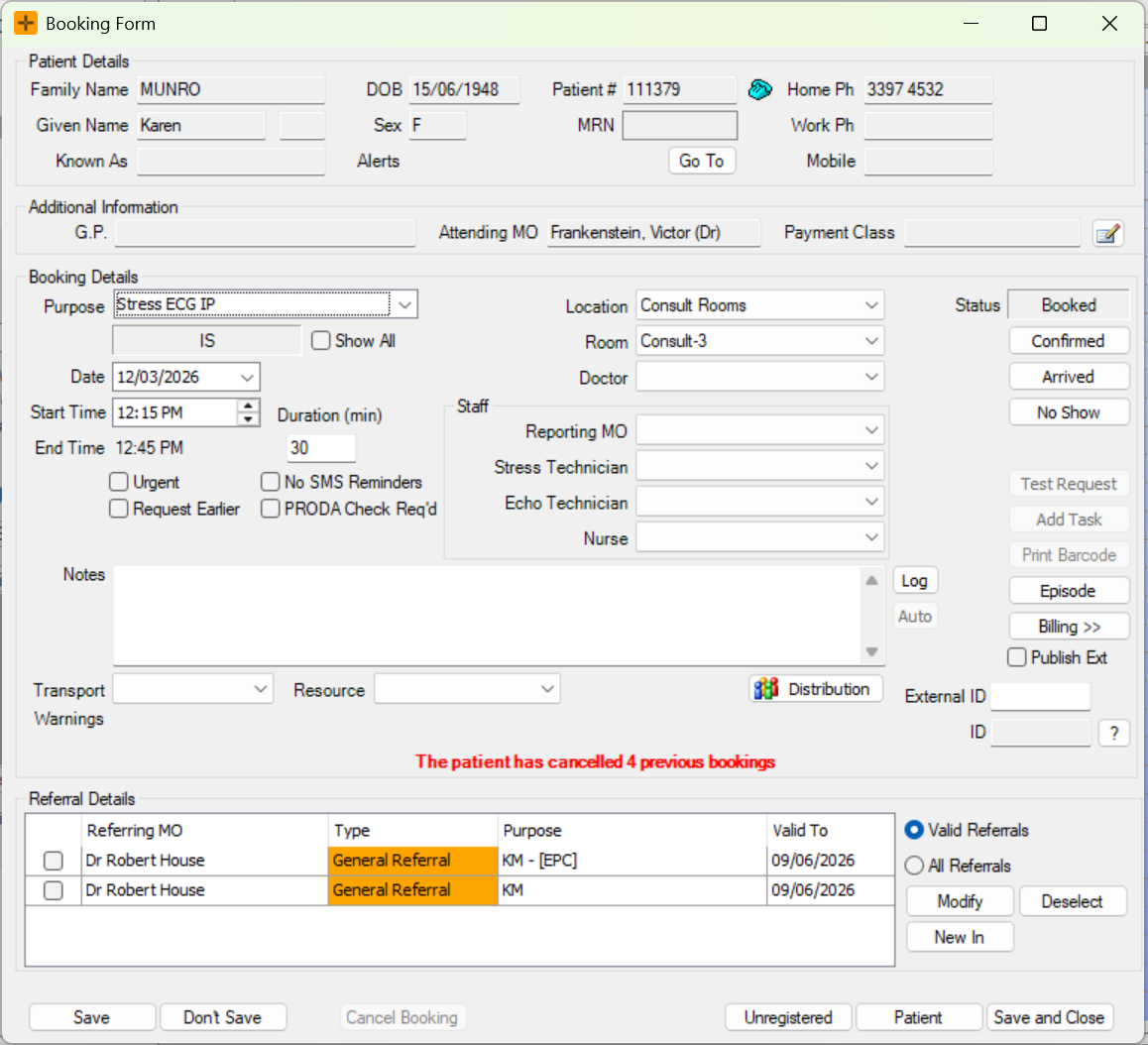
- Double-click the booking in the Diary to open the Booking Form.
- In the Booking Form, locate the Notes field.
- Enter your note text.
- This field accepts free text and is specific to this booking.
Click the Log button to auto fill in your user details, date and time before entering your diary note.

- Click Save and Close.
View booking notes in the Diary
Once saved, you can hover over the booking in the Diary to display the note text as a tool tip.
The booking note shows only when you hover over the booking. It is not displayed as a label or an icon on the booking tile itself, so a booking with a note looks the same on the Diary as one without. If a staff member reports that they cannot see a note, ask them to hover over the booking.
Use the Hide Notes / Show Notes button in the Options Bar at the bottom of the Diary screen to select if you want diary notes to show when you hover over a diary booking

Notes are specific to each booking. They do not carry over to future bookings for the same patient.
Booking notes and patient alerts are different
A booking note is easy to confuse with a patient alert, but they are separate things:
- A booking note is free text attached to one booking. It shows only in the hover tool tip for that booking and applies to that appointment.
- A patient alert is set against the patient, not the booking. It shows as an icon on every booking for that patient and appears in the alert section of the hover tool tip. Patient alerts are a patient-level warning, so they carry across all of that patient's appointments.
Editing or clearing a booking note does not change a patient alert, and clearing a patient alert does not change any booking note. If a warning is showing on all of a patient's bookings, it is a patient alert rather than a booking note.