
How to print a Daysheet
- Navigate to Diary > Open Diary (shortcut:
CTRL+D). -
Select the Print button at the bottom of the Diary screen.
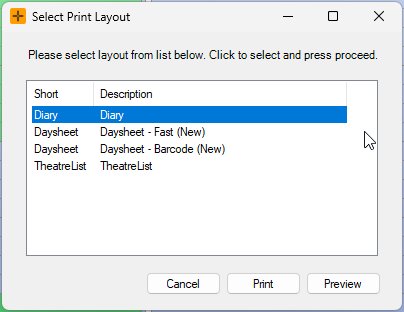
In the Select Print Layout screen, select 'Daysheet - Fast'.
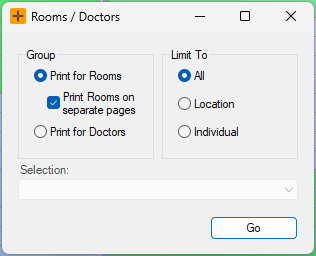
In the Rooms/Doctors screen, filter by the relevant 'Group' and select the required 'Limit To' option.
-
If you would like to limit the Daysheet to a particular location/individual, you will need to select them from the Selection field drop-down list.
-
- Select the Go button.
-
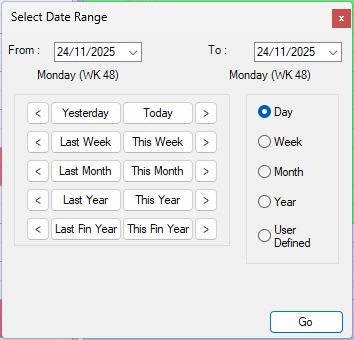
In the Select Date Range screen, set the required date range.
-
To start all Daysheets at a particular fixed time, in the Report start time screen, update the drop-down to the preferred time of choice.
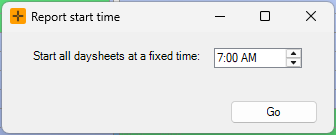
- Select Go to print the Daysheet.
Daysheet variants
The Print button on the Diary offers more than one output:
- The Daysheet report is a printed list of the day's appointments, showing the time, patient, booking type and a notes column. This is the layout most practices use.
- The Theatre List is a wider variant of the report built for surgical run sheets. It adds full patient details and insurance identifiers (Medicare, fund and DVA). It does not show any fees or amounts, as there is no billing Daysheet.
- The diary-grid print prints the diary as it appears on screen (the calendar grid), rather than as a list.
You can also control how the report is grouped and scoped:
- Group the sheet by room or by doctor/person, with the option to start each room or doctor on a separate page.
- Limit To a scope of everyone in your locations, a single location, a single room, or one doctor.
- Set a single day or a date range in the Select Date Range screen.
Choose what appears on the Daysheet
Which details print on the Daysheet is controlled by a site-wide setting, not by the person running the report. This covers whether the sheet shows the patient's date of birth, mobile and home phone, email, MRN, Medicare or NHI number, referring doctor, GP, and the free-text booking notes.
- This can be done through Admin > Maintenance > System Settings via the DaySheetReportConfiguration or TheatreListReportConfiguration settings.
- Because this is a site-wide setting, a change applies to everyone who prints the Daysheet at your practice.
Any changes to System Settings apply across the entire system and will take effect immediately. When in doubt, contact HealthTrack Support for assistance with amending settings in this screen.
If a booking or field is missing
- A booking is not on the sheet. The Daysheet report includes both registered and unregistered bookings, but it leaves out bookings that have been deleted. A deleted booking will not appear, even for a past date.
- Cancelled bookings. The Show Cancelled option applies only to the diary-grid print, not to the Daysheet report. Turning it on or off does not change whether cancelled bookings appear on the printed appointment list.
- The sheet prints empty. If there are no matching bookings for the chosen scope and dates, the Daysheet prints as an empty sheet. Check the Group, Limit To and date range are set as you expect.
- A field (such as notes, phone or patient ID) is not printing. This is almost always the site-wide setting above rather than a fault with a booking. If a field should appear and does not, the setting controls it. See the section above.