
How to add a condition to the patient
- Navigate to the 'Conditions' section in the Clinical Summary tab.

- To add a new condition to the patient, select New.

- In the Conditions screen, select an option from the drop-down list in the 'Summary' field, and/or enter the condition in the 'Additional Text' field.
- Set the 'Start Date' and 'End Date'.
- The Accuracy checkbox allows for the full date to be entered or you can enter month/year or year only.
- Populate any further details required and select Save and Close.
Adding Multiple Conditions
- Navigate to the 'Conditions' section in the Clinical Summary tab.
- Select the Multi button.
- In the Conditions Multi Adder screen, enter each condition on a separate line.

- To add the conditions to the patient with today's date, select Add.
Adding via the Clinical Notes section
- Navigate to the 'Clinical Notes' section in the Clinical Summary tab.
- Select New.
- To add a new Condition to the patient, select the Dx button in the Consultation Notes section.
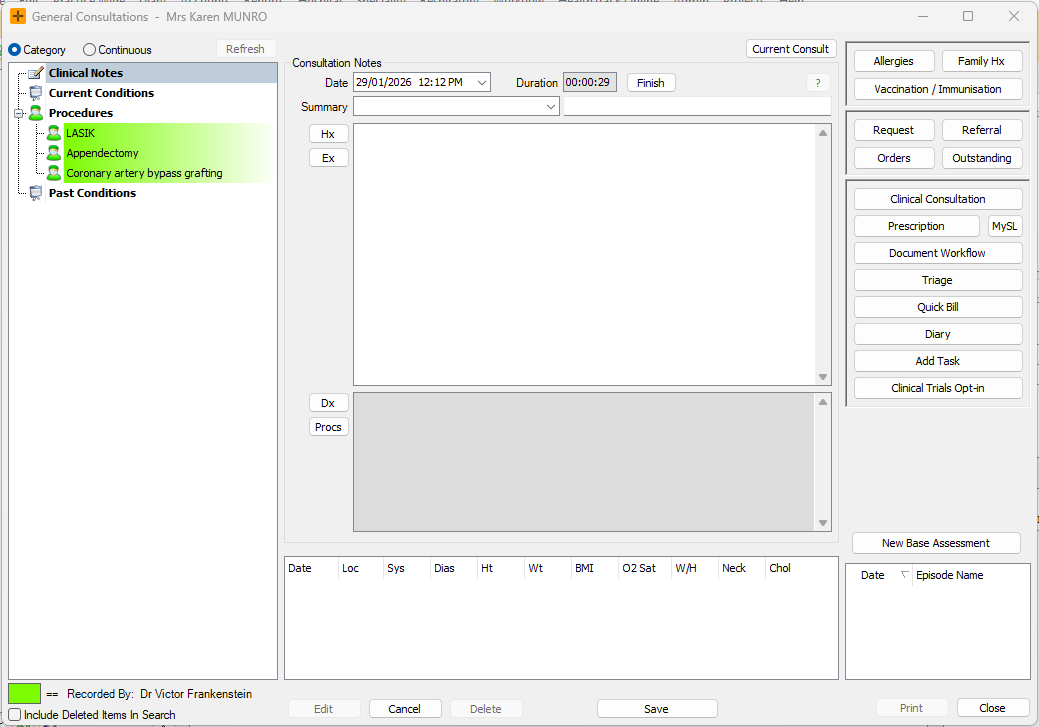
- Populate the details as required in the Conditions screen that opens and select Save and Close.
Current and resolved conditions
HealthTrack treats each condition as either current or resolved, based on the 'Current' check-box:
- A condition with 'Current' ticked is treated as current (still active for the patient).
- Where 'Current' is un-ticked, the condition is marked as resolved. It stays in the patient's history and remains visible in the Conditions list, but is not immediately visible in the Clinical Summary at a glance.
- Select View to view past (resolved) conditions.

Only current conditions are pulled onto letters via letter template tags. If a condition is not appearing on a letter, it is most likely marked as 'Not Current'. Tick to make it current again, or check the letter template if a genuinely current condition is still missing.