
Assistant Billing
Begin by opening a new invoice. For instructions on creating an invoice, review our How to create an invoice article.
Invoicing Principal Provider & Assistant Provider
Where possible, we recommend invoicing both the principal provider and the assistant together. There may be cases where this cannot be achieved, for example, if the principal provider uses a different software to perform their billing.
- Confirm or specify the standard details of the invoice, including:
- The referral details. Use the Find Referral button to specify a referral, if required.
- The Invoice To and Fee Table drop-downs.
- Select the Inpatient and Batch Billing check-boxes if appropriate.
- The Service Location.
- The Attending MO is the principal provider for the services.
- The Provider No for the principal provider.
- Set the Service Date.
- Enter the Item Number for the operation.
- Select the Add Item button.
- Repeat Steps 2-4 for any additional services.
- Use the Apply Rules button to confirm any multiple operation rules.
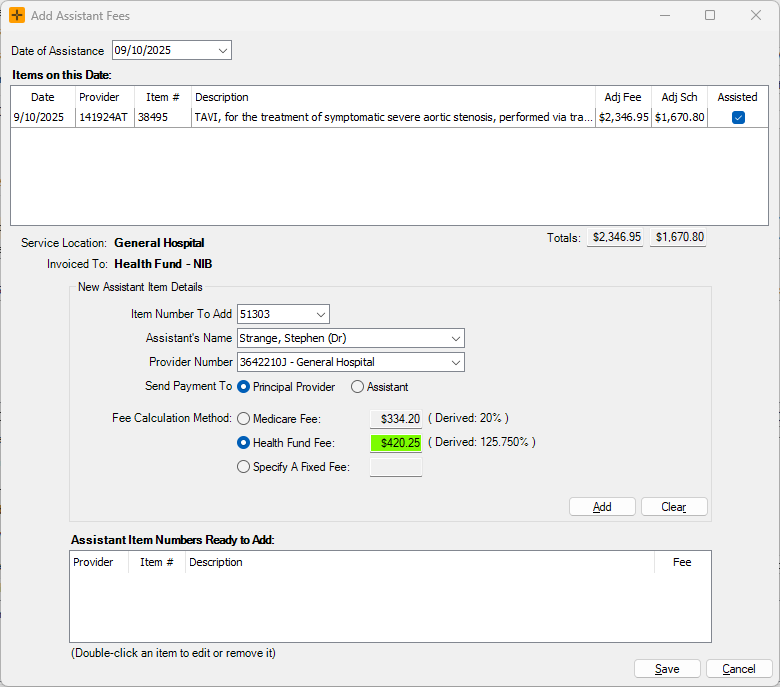
- Select the Assistants button.
- In the Add Assistant Fees window, enter the Date of Assistance and populate the New Assistant Item Details.
- Use the Details button to record financial disclosure.
- Select the Issue button.
Invoicing Assistant Only
Invoicing for only the assistant provider follows the same process described earlier, with an additional step.
After Step 9, double-click on the principal provider's operation item numbers in the Invoice Items pane to remove them from the invoice. This should leave only the assistant provider's item number, and the invoice can be issued accordingly.
Configure an Assisting Provider
Before beginning assistant billing, you may need to configure the assisting provider in HealthTrack.
- Navigate to Admin > Internal MO > Manage Internal MOs.
- Select the doctor from the Change MO drop-down in the top left of the window.
- Select the Edit button.
- Select the Assistant Only checkbox if this doctor will only be used in an assistant capacity.
- In the Location & Health Fund Specific Provider Numbers pane, highlight the provider number for the location where the doctor provides assistant services.
- Select the Edit button.
- Select the Also An Assistant checkbox.
- Select the Save button for the provider number.
- Select the Save button for the Internal MO record.
Assistant Billing Item Numbers
You may need to review the MBS Online section for Assistance at Operations to determine the correct item number to be used.
These item numbers can be enabled in HealthTrack by navigating to Admin > Billing > Add/Modify Billing Items. In this window, you can use the New Medicare Item button to add the necessary item numbers.
Many item numbers for billing assistance will use a derived fee, which is calculated on the combined fee of eligible operation services. For this reason, it is not uncommon that the billing item will not display any fees in the Add/Modify Billing Items window.