
How to add default interested parties
Default interested parties can be added to a patient's file to record the parties who require a copy of correspondence about the patient, such as their GP, a referring specialist, or a third party. These interested parties are then automatically included on the Distribution List whenever a patient record needs to be shared.
Add default interested parties
- Navigate to the patient's Demographics screen.
-
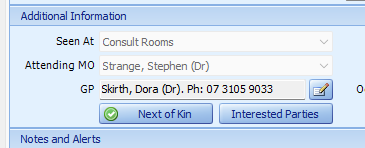
Select the Interested Parties button.
-
In the dialog that opens, select the checkboxes for any required interested parties for the patient.
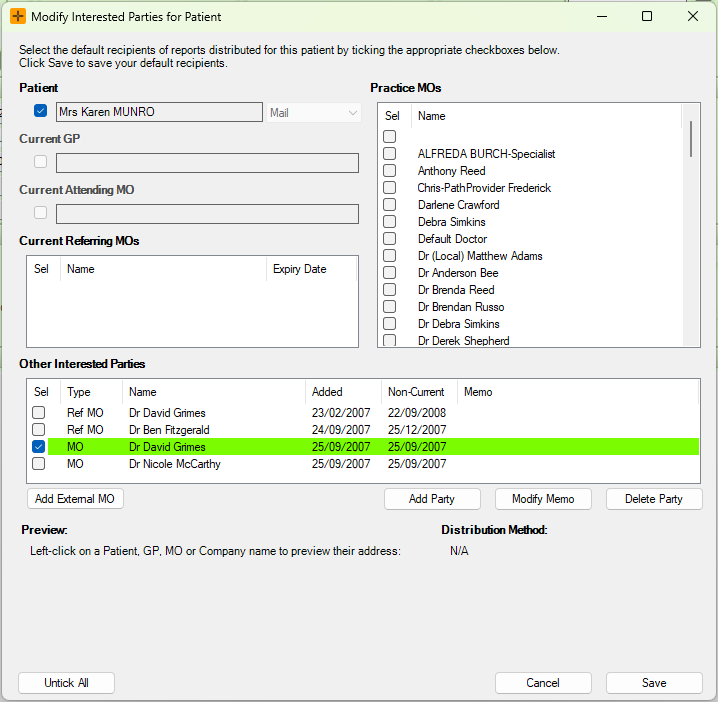
- Select Save.
Following the above steps will ensure that any records made for the patient will be automatically distributed to the selected interested parties.
The patient's current GP and attending doctor are shown on this screen automatically. In most practices the GP is included on every new Distribution List whether or not they are selected here. This is controlled by the DefaultDistributionIncludesGP setting (via Admin > Maintenance > System Settings), so check with your practice manager if the GP should not receive copies.
What happens when the patient's GP changes
When you change the patient's GP on the patient details screen and save, HealthTrack does two things:
- Updates the GP entry in the patient's interested parties list.
- Re-points the patient's pending deliveries that are addressed to the GP, so documents still waiting to send go to the new GP instead. A message confirms how many deliveries were updated.
Only deliveries that have not yet been sent are updated. Anything already delivered to the old GP stays exactly as it was, which keeps the historical record accurate.
When creating referrals, selecting the Set as Patient's Current GP check-box updates the GP set in the Demographic screen to the Referring Doctor selected in the Add/Modify Referral screen.

If results are still going to the old GP
The usual causes are:
- The delivery had already been sent before the GP was changed. Sent deliveries are never re-pointed. Any new correspondence will go to the new GP.
- The GP was added to a document's Distribution List by hand as a general copy recipient. A manually added entry is not recognised as the patient's GP entry, so a GP change will not update it. Remove the old entry from the document's Distribution List and add the new GP.
- The GP was changed somewhere other than the patient details screen. The re-pointing of pending deliveries only occurs when the GP is changed and saved on the patient's Demographic screen.
If the GP appears missing from the Interested Parties screen, it may be because the GP was recently updated. New documents still distribute to the correct current GP, but the Interested Parties screen may not show them until the patient's file is refreshed.