
All Patient Bookings screen
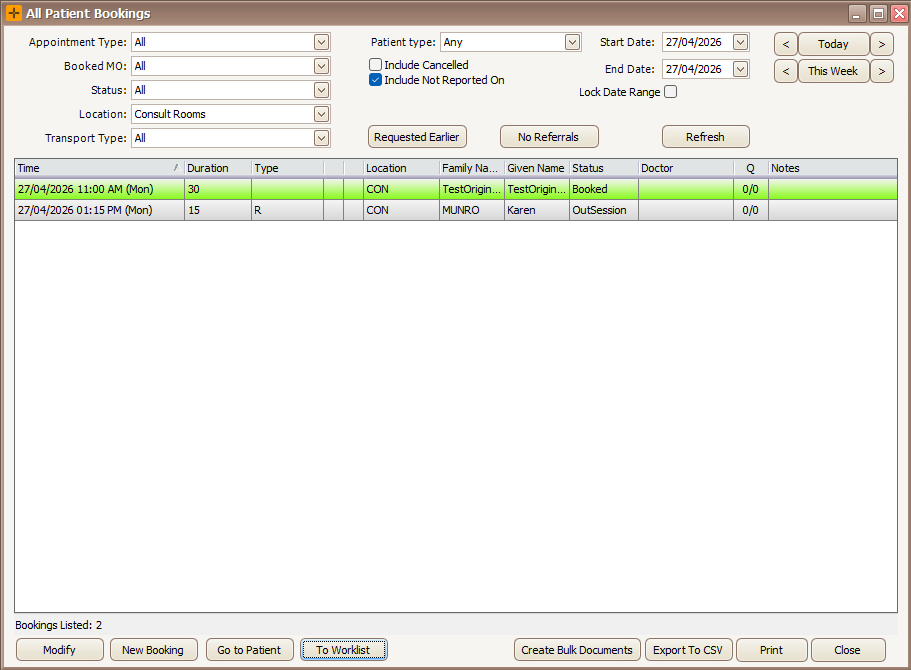
The All Patient Bookings screen is the practice-wide view of bookings across all patients. Use it to filter, review, and act on bookings without opening the diary or individual patient records. It is a list view, not the calendar diary.
Open the All Patient Bookings screen
- From the main menu, select Practice Wide > Bookings.
- The layout is similar to a patient's Bookings tab. Filters sit at the top of the screen, and the matching bookings appear in the list below.
- When the screen first opens it shows a short date range at your home location, not every booking on file. Widen the Start Date and End Date range, or change the Location filter, to see more.
Filter the list
- Filter the bookings shown by any combination of the following:
- Appointment Type
- Booked MO
- Status
- Location
- Patient Type - filters Registered or Unregistered bookings. Unregistered bookings are flagged with a green information icon.
- Cancelled - select the Include Cancelled checkbox, or select Cancelled from the Status drop-down, to show cancelled bookings.
- No Referrals - shows only the bookings in the current list that do not have a referral attached.
- Requested Earlier - shows only the bookings in the current list that are flagged as having requested an earlier time.
- Start Date and End Date - use the buttons to the right of each date field to set the range by day or by week.

Selecting No Referrals and Requested Earlier trims the list that is already on screen and highlights the filter panel. To clear them and load the full list again, re-run the search (for example by changing a date or another filter).
Actions on a selected booking
- Select a booking from the list, then use the action buttons:
- Modify - opens the selected booking in edit mode.
- New Booking - creates a booking for the selected patient without opening the diary.
- Go to Patient - opens the selected patient's demographic screen.
- To Worklist - adds every patient in the current list to the Worklist.
- Print - prints one of three reports: All Patients Booking Summary, Patient Encounter List, or Patient Encounter List Expanded.
- Export to CSV - exports the bookings on screen to a spreadsheet.
- Create Bulk Documents - generates a letter for every patient in the list at once (see "Create bulk documents" below).

Creating a booking from New Booking bypasses the diary, which can result in double bookings or bookings outside a doctor's hours of operation. Use this only when the booking time is known. Otherwise, make bookings from the diary.
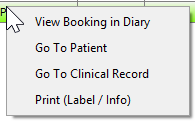
- Right-click a booking in the list to:
- Select View Booking In Diary to jump to the booking in the diary.
- Select Go To Patient to open the patient's record.
- Select Go to Clinical Record to open the clinical record linked to the booking.
- Select Print (Label/Info) to select a print layout and print.
Create bulk documents
Create Bulk Documents produces one letter for a group of patients in a single run, based on the bookings currently shown.
- Filter the list so it shows the bookings you want to write to.
- Select Create Bulk Documents.
- Choose the letter template to use.
- Choose a folder to save a copy of the generated letters to.
- HealthTrack then creates the letter for each patient and files a copy in each patient's record.
Bulk documents are based on the bookings currently shown in the list, so set your filters first. If a patient has more than one booking in the list, only their latest booking is used, so each patient receives one letter. If a letter does not appear for a patient, check that patient's record before running the job again.
Large date ranges and performance
The screen does not limit how many bookings it loads and does not warn you when a range is very large. Selecting a wide date range (or an open-ended forward range) can load a large number of bookings and take some time, with only a wait cursor to show it is working. Keep the date range as narrow as you need, and add filters such as Location or Booked MO, to keep the list quick to load.