
How to track outbound referrals
Outbound referrals marked to be tracked appear on the Outstanding Requests screen, where they stay until someone confirms them. Only tracked referrals show here, so an outbound referral that was not set to be tracked will not appear.
The same screen also tracks pathology, radiology, and other test requests, so you can review every outstanding request a doctor or patient has open from one place.
How a referral gets here
An outbound referral appears on this screen only when it was set to be tracked at the time it was created. When someone creates the referral, they select the Track checkbox referral form. This also raises an outstanding referral alert on the patient.
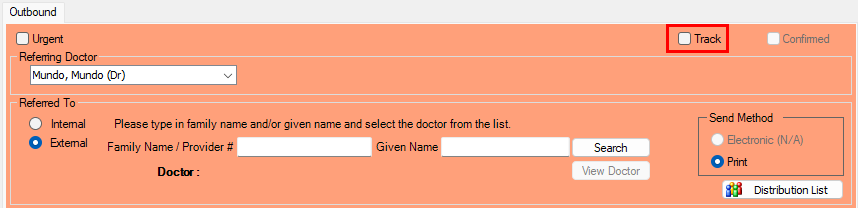
If a referral is not on this screen, the most likely reason is that it was not set to be tracked when it was created. Untracked referrals are never listed here.
Open the Outstanding Requests screen
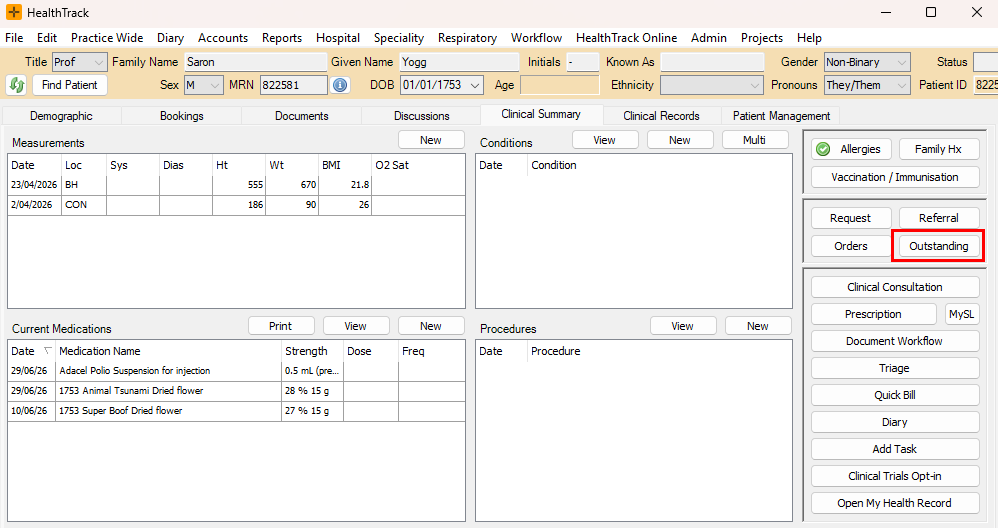
The Outstanding Requests screen is accessible from two places:
- Click Outstanding on the Clinical Summary tab.
- Click Outstanding on the Requests menu.
Filter by request type and view
The screen lists Outbound Referrals, Pathology, Radiology, and Other Test Requests. Filter the list to one, several, or all types. To review outbound referrals on their own, filter the list to referrals.
At the top of the screen, choose whether to view requests by:
- Doctor - shows requests for one or all doctors, listing every patient.
- Patient - shows all requesting doctors' outstanding requests for a single patient.
View completed or deleted requests
To review historical requests, select:
- Show Confirmed - displays previously confirmed requests.
- Show Deleted - displays previously deleted requests.
A deleted request can be brought back: show deleted requests, then restore the one you need.

Actions on a request
From the request list you can:
- Reprint - reprint a referral or request.
- Confirm - mark the request as completed. Confirming an outbound referral clears it from this screen and clears the patient's outstanding-referral alert.
- Delete - mark the request as no longer needed.
- Export - export selected requests to a CSV file.
- To Worklist - send selected patients to a worklist for follow-up.
Confirming is the way to clear a tracked outbound referral. It stays on this screen until it is confirmed.