
How to bill a company or third party
Sometimes the account for a service goes to an organisation rather than the patient: an employer, a sporting club, a government agency, a hospital or another practice. HealthTrack handles this with company accounts. The company gets its own account, its own transaction listing and its own statements, separate from any patient.
Set up the company
The company needs to exist in HealthTrack before you can bill it. See How to add a Company/3rd Party.
Direct an invoice to the company
- Create the invoice for the patient as usual.
- Invoice To '3rd Party' and select the company via the Change button.
- Add the billing items and issue the invoice as normal. See How to Create an Invoice.
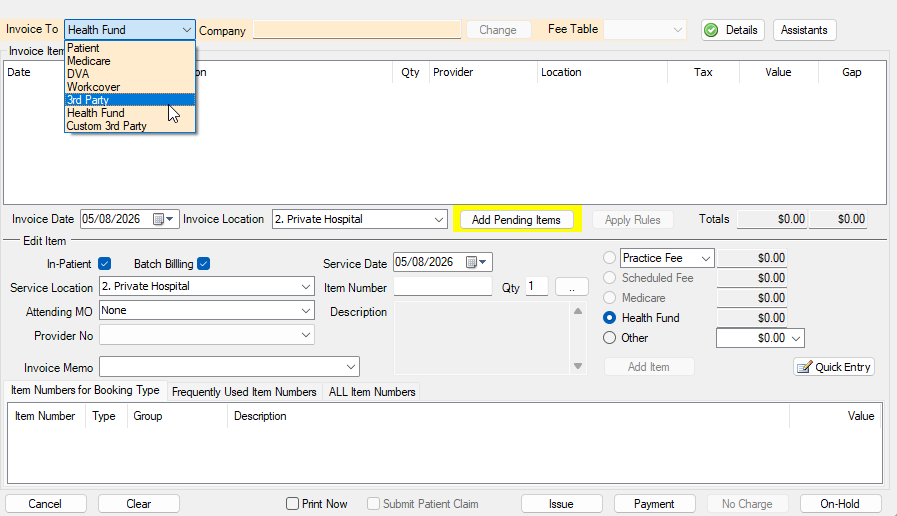
The service still appears in the patient's history, but the amount owing sits on the company's account.
Receiving the company's payment
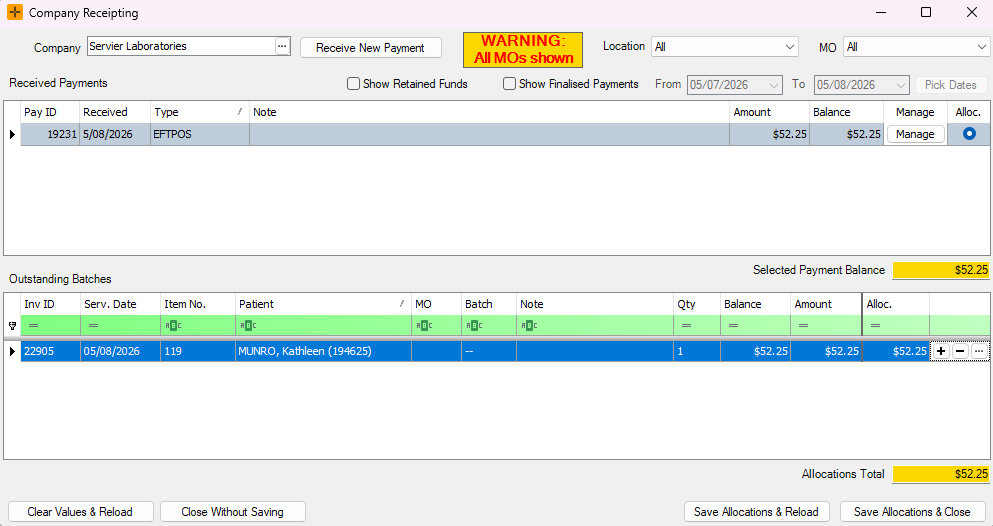
- Go to Accounts > Company Receipting.
- Select the Company via ... from the Company field.
- Select Receive New Payment. See How to receive a payment.
- Allocate the payment. See How to allocate a payment.
Keep on top of company balances
Company balances appear alongside patient balances in the Debtors Listing Report. Reviewing it monthly is the easiest way to catch third-party accounts drifting overdue.