
Base Assessment
The Base Assessment is a Clinical Record that can be used to record patient vitals and measurements. Certain measurements recorded in the Base Assessment will also be displayed in the Measurements table on the patient's Clinical Summary tab.
HealthTrack has an alternative Base Assessment record to populate details more relevant to sleep and respiratory specialists. As only one version of the Base Assessment can be in use, please contact HealthTrack Support for details of the respiratory Base Assessment version.
Create a Base Assessment
A Base Assessment can be entered in several ways:
- From the Measurements section on the Clinical Summary tab, select the New button.
- From the Clinical Records tab, select the Base Assessment folder, then select the New button.
- From a Clinical Note, select the New Base Assessment button.
From the new Base Assessment record, you can record various measurements, as well as populate measurements from recent pathology results.
After recording any new data, select the Save button to save the changes.
If a previous Base Assessment record exists, the values will carry forward to the newly created record, where they can be updated.
Units & Calculations
Several measurements have the option to change how the values are recorded.
| Height |
Use the Feet / Inches button to record the value in feet and inches. This button can also convert an existing measurement from centimetres. Conversely, use the Centimeters button to record or convert a measurement in centimetres. |
| Weight |
Use the Stone / Pounds button to record the value in stone and pounds. This button can also convert an existing measurement from kilograms. Conversely, use the Kilograms button to record or convert a measurement in kilograms. |
| Waist, Hip, Neck, Head |
Use the Inches button to record the value in inches. This button can also convert an existing measurement from centimetres to inches. Conversely, use the Centimeters button to record or convert a measurement in centimetres. |
Some measurements can also be calculated automatically.
| BSA |
The BSA is calculated automatically using the patient's Height and Weight measurements. This can be calculated using a variety of methods:
|
| BMI | The BMI is calculated automatically using the patient's Height and Weight measurements. |
Graphs
To view a measurement trend as a graph, double-click a column heading in the Measurements table.
Paediatric Growth Charts
For patients under 17 years of age, HealthTrack can plot weight, height, head circumference, BMI and weight-for-height against population percentiles. The patient's sex must be set in the Demographic screen in order for the growth chart to open. To access these charts, select the Paediatric Growth Charts button from the Risk Factors section.
Cardiac Overview
The Base Assessment record includes a Cardiac Overview tab with a checklist of cardiac-related clinical items. The checklist must be verified to confirm the items have been reviewed.
- While editing a Base Assessment record, select the Cardiac Overview tab.
- Review the checklist items, then click Verify.
- The border surrounding the Cardiac Overview section will change from red to green, and the verifying user's name, date, and time are recorded.
- When you have completed any data entry for the Base Assessment, click Save.
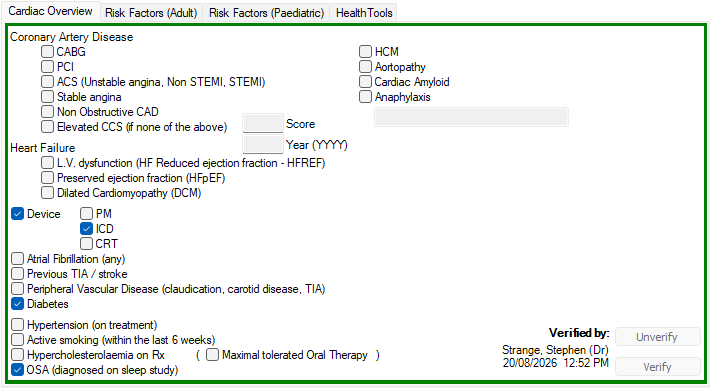
To reverse a verification, click Unverify. The border changes back to red.