
How to change the account holder
In HealthTrack, patients in the same family share one account, and one family member is the account holder. The account holder's record owns the family's shared addresses, including the invoice address. A patient who is not part of a family is their own account holder.
Change the account holder
- Navigate to the patient's file and go to the 'Demographics' tab.
- Select Edit Patient.
-
Under the 'Address' Section, select Other Addresses and Family Members.
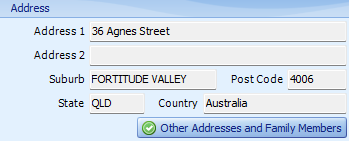
- If the new account holder is not yet part of the family, select Add Family Member, search for them and select them.
-
Under the 'Family Members' section of the 'Addresses' screen, select the new account holder, then select Make Account Holder.
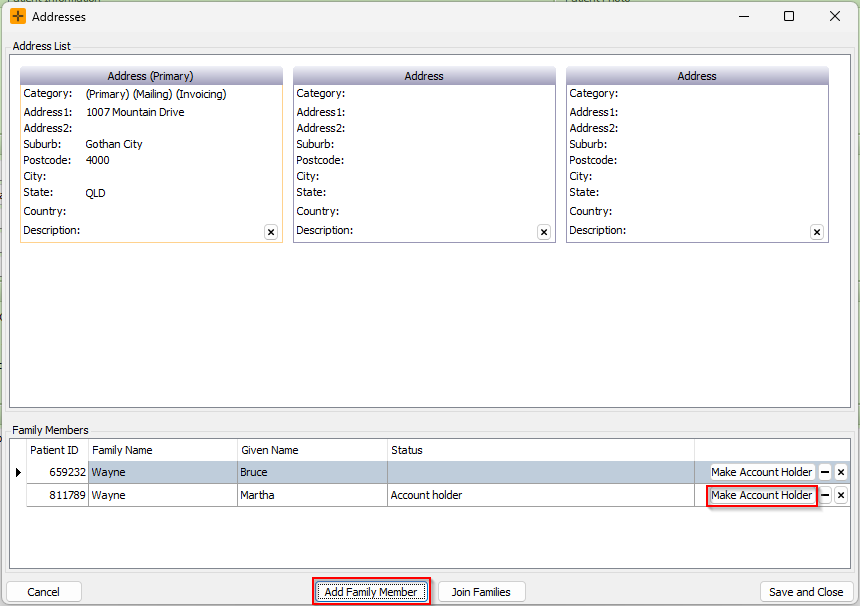
- Select Save and Close.
Make Account Holder can only be used on a family member who is not already the account holder. If you select the current account holder, HealthTrack shows the message "This operation is not allowed on the account holder".
The account holder must be a patient in the family. A company, guardian or other third party cannot be made the account holder. If invoices need to go to a company or third party, that is set separately through the patient's 'Invoice To' billing settings.
What changing the account holder does
- Every member of the family is moved onto the new account holder's account.
- The family's shared addresses, including the invoice address, move to the new account holder's record.
- HealthTrack does not warn about outstanding balances when you change the account holder. If the family account has an outstanding balance, check with your billing staff before making the change.
If you cannot delete a patient
Two common blockers stop a patient record from being deleted:
- The patient is the account holder for a family. A patient who heads a family account cannot be deleted while other members are attached to their account. Change the account holder to another family member first (steps above), then delete the record.
- The patient has an outstanding balance. A patient with an outstanding balance cannot be deleted. The balance needs to be resolved before the record can be removed.
The same account-holder blocker applies to patient merges. The record being deleted in a merge cannot be a family account holder, so change the account holder first. For the steps, review our article: How to merge duplicate patients.
Other rules to be aware of
- Adding an existing account holder to another family. A patient who is already the account holder for a family with other members cannot be added into a different family. Their own family needs a new account holder first.
- Removing a member from a family. A member removed from a family becomes their own account holder again, and the family's shared addresses are copied onto their record.