
How to reschedule a Booking
There are multiple ways to reschedule a booking in the Diary. After navigating to Diary > Open Diary (shortcut: CTRL + D ), you can select the booking you would like to reschedule and use one of the methods below:
Adding a Booking to the Move List
Using the Move List Buttons
- Select the booking in the Diary.
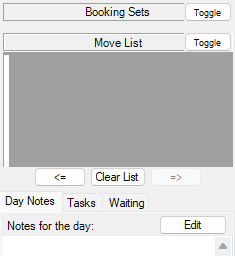
- On the left-hand side of the screen, select the <= button to add the booking to the Move List.
- Navigate to the new date and updated time slot in the Diary.
- Select the => button to move the booking to the new date and time.
Using 'Cut' and 'Paste'
- Right-click and cut the booking. Shortcut: press
CTRL+X. - This will add the booking to the Move List in the left-hand side of the screen.
- Find the reschedule date and 'paste' the booking. Shortcut: press
CTRL+V.
Copying and Pasting a Booking
- Right-click and copy the booking. Shortcut: press
CTRL+C. - Find the new date and 'paste' the booking. Shortcut: press
CTRL+V.
Copying creates a second booking and leaves the original in place. If you use copy and paste to reschedule, cancel the original booking afterwards so the patient does not have two bookings.
Dragging the Booking
- Click the booking and drag it to an alternate time slot.
What happens when you reschedule
A reschedule moves the same booking. The booking keeps its patient, booking type, referral, notes and history; only the date, time and room change. Because the booking keeps its identity:
- The referral attached to the booking stays attached. You do not need to re-select it after a move.
- The booking's history records the previous date and time, so you can always see where it was moved from and how many times it has changed.
- Anything linked to the booking, follows it to the new time.
If the booking type is set up to send SMS confirmations, moving the booking can queue a new confirmation message to the patient.
Moving a booking to another location
You can reschedule a booking into a room at a different location. Three things to be aware of:
- You need permission to edit bookings at both locations: the one the booking is moving from and the one it is moving to. If the move is refused, check your location access with your practice manager.
- The booking's billing location and the doctor's provider number are re-derived from the new location automatically. This happens without a prompt, so a booking moved across locations will bill under the new location's details.
If an invoice appears under the wrong location, check the booking's history for a cross-location move. The move re-derives the billing details; it does not keep the original location's provider number.
- Moving a booking to a room with a default doctor set prompts you to update the doctor to the room's default doctor.

Bookings that cannot be rescheduled
- Closed and Cancelled bookings cannot be moved. A cancelled booking cannot be restored, so make a new booking instead.
- If another user changed the booking while you were moving it, HealthTrack refuses the move and asks you to reopen the booking. Refresh the Diary and try again.
If a number of bookings in the diary need to be 'relocated' to an alternate room/location for a particular Doctor, the Booking Relocator feature can be used. For further details, review our How to use the Booking Relocator article.