
How to use the Booking Relocator
The Booking Relocator is an admin tool that moves a batch of bookings from one Location and Room to another. It is useful when a room is closed and the bookings sitting in it need to be shifted elsewhere.
The Relocator only changes the Location and Room on a booking. It does not change the doctor, and it does not change the appointment date or time. To reassign a provider or move an appointment to another day, use the Diary instead.
Moving bookings to another Location or Room
-
Navigate to Admin > Maintenance > Booking Relocator.
Populate the fields with the relevant information:
- The From Location and Room (the bookings you want to move).
- The To Location and Room (where they should go).
-
Optionally, a Doctor and a start date to narrow which bookings are moved. The doctor is a filter on which bookings are selected, not a target. The bookings stay with the same doctor after the move.
The screen shows a count of how many bookings will be moved. This is a count only, not a list of the individual bookings.
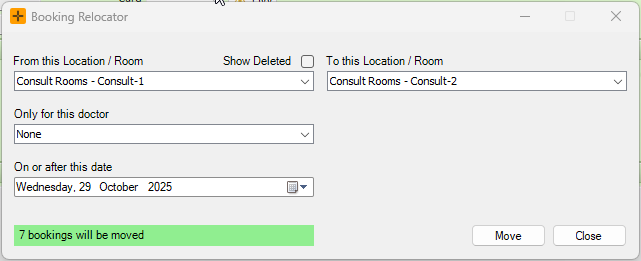
- Select Move to move the bookings to the alternate Location and Room.
No clash checking
The Booking Relocator moves the matching bookings straight across without checking for clashes, room availability or session hours. It can double-book the target room, and there is no per-booking review before the move runs. Check the target Room manually after a large move.
What the Relocator does not change
The Relocator only reassigns the Location and Room. It leaves the following untouched:
- The doctor and the appointment time. These are never changed. Reassign a provider or move a time on the Diary.
- Booking status and referral. Neither is changed by the move.
- Patient notifications. Moving a booking does not send the patient an SMS.
- Billing location and provider number. These are not updated, so billing can keep pointing at the old Location after a move. Check and adjust the billing Location if needed.
Things to know
- The source list has no end date and no status filter. It moves everything from the start date forward, including cancelled and closed bookings that match. Narrow the move by start date to limit what is swept in.
- Running the Relocator requires the CanMoveBookings permission.