
How to make a recurring Booking
HealthTrack can create a series of bookings for a patient who needs to come back on a regular pattern, for example weekly wound care or a monthly review. There are two ways to do it, and they behave differently, so pick the one that suits.
Two ways to make a recurring booking
- Recurring Appointments builds the series from scratch. You choose the pattern, then place each booking in the Diary yourself. Every booking goes through the normal checks, so you will be warned about clashes and closed times as you go.
- Repeat Unregistered Booking copies an existing unregistered booking onto a pattern of dates in one action.
Method 1: the Recurring Appointments window
- Navigate to Diary > Recurring Appointments to open the Recurring Appointments window.
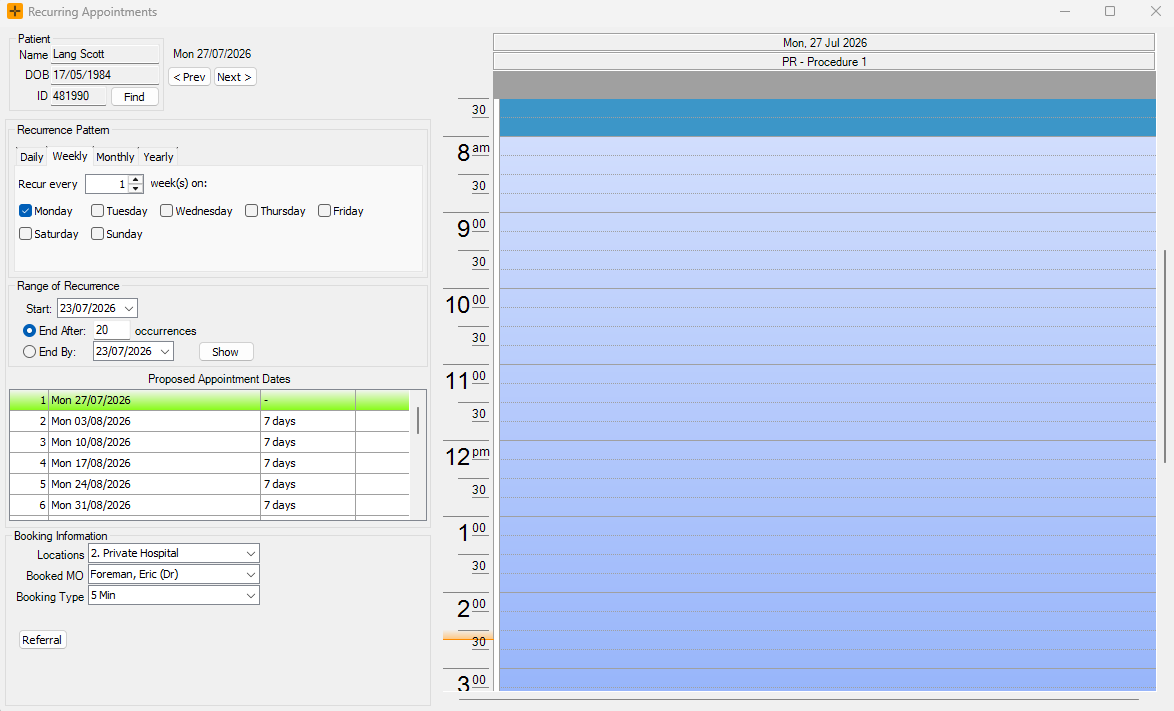
- Select the recurrence pattern as required (daily/weekly/monthly/yearly).
- Choose the range of recurrence by the number of recurrences or date range.
-
Select the desired time slot in the Diary on the right-hand side of the screen to open the booking form.
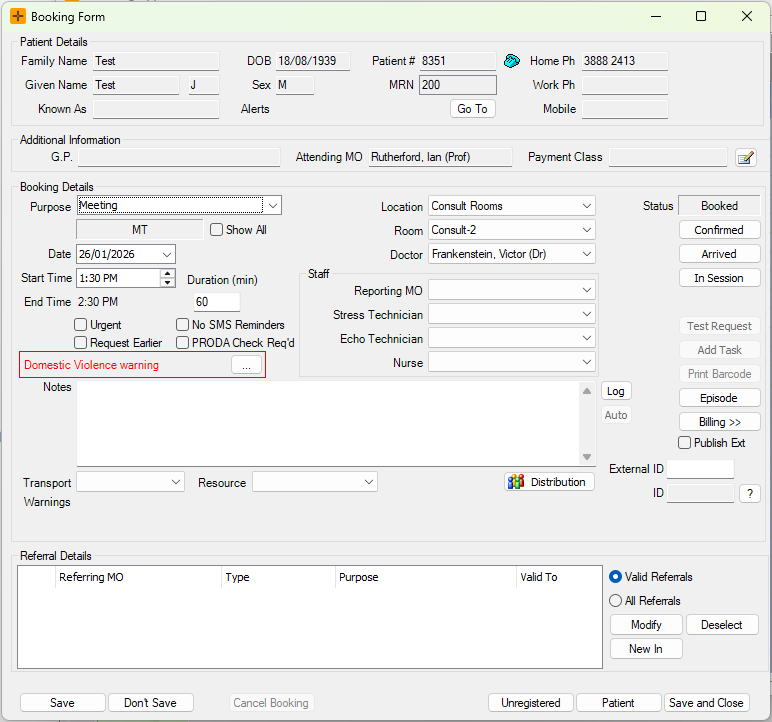
- Edit the details for the booking as required.
- Save and Close the booking form.
The list of dates on the left is a guide only. A booking is created each time you place one in the Diary, so repeat steps 4 to 6 for every date in the series. Because you place each booking yourself, HealthTrack runs its usual checks and warns you if a slot clashes or falls outside opening hours.
Method 2: Repeat Unregistered Booking
Repeat Booking clones an Unregistered Booking that is already in the Diary onto a pattern of dates.
- In the Diary, right-click the unregistered booking you want to repeat.
- Select Repeat Booking.
- Choose the recurrence pattern and the range of recurrence.
- Confirm to create the bookings. Every booking in the series is created straight away, at the same time of day as the original.
Repeat Booking does not check the new dates before creating them. It skips the double-booking, opening-hours, holiday and roster checks, so the series can land on top of other bookings or on days the practice is closed. After creating the series, check the Diary on each date and move anything that clashes.
Choosing the recurrence pattern
Both methods use the same pattern options:
- Daily, Weekly, Monthly or Yearly, each with an "every N" interval (for example, every 2 weeks). Weekly patterns need at least one weekday selected.
- Range of recurrence: end after a set number of occurrences (the default), or end by a date.
- The start date cannot be in the past.
- Every booking in the series is made at the same time of day as the first one. The pattern only changes the dates.
There is no limit on how many bookings a pattern can create. Check the end rule before you confirm - a daily pattern with a far-off end date creates a very long series, and each of those bookings has to be cancelled one by one if it was a mistake.
There is no series edit
HealthTrack does not save the recurrence pattern. Once the series is created, each booking is an ordinary, independent booking:
- Editing one booking (time, doctor, notes) changes that booking only. Nothing carries across to the rest of the series.
- There is no "edit whole series" or "this and future bookings" option.
- You cannot view or re-run the pattern later. If the whole series needs to change, cancel the remaining bookings and create a new series.
Cancelling a series
The bookings in a series are linked, so you can cancel them together:
- Open any booking in the series and select Cancel Booking.
- HealthTrack asks whether to cancel this booking only or the linked bookings as well.
Cancelling the series only cancels the bookings that are still active (Booked, Confirmed or Arrived). Bookings already closed, marked No Show or previously cancelled are left as they are. The cancellation reason you choose is copied to every booking that is cancelled.
What recurring bookings are not
A few other HealthTrack features sound similar but do a different job:
- Recurring diary templates and rosters set up the doctor's or room's available time. They do not book patients.
- Recalls remind a patient to book a follow-up. A recall never creates a booking by itself.
- Group bookings put several patients into one slot, for example a class.
- Booking Sets book a bundle of different booking types together for one visit, not a repeating pattern of dates.