
Telehealth Consulting
Telehealth consulting lets a registered doctor run a video (or phone) consultation with a patient without either party being in the practice. HealthTrack runs the video call through the GP Consults service. You start and end the consult from the Telehealth Call List in the diary, and the booking status updates as you go.
Before you start
Confirm the following before running a telehealth consult:
- The doctor must be registered for Telehealth through the GP Consults website, and the Registered for TeleHealth checkbox must be selected in their provider profile.
- The doctor must have a default provider number set in their profile. A consult cannot be started without one.
- The patient's booking must use a Telehealth booking type configured in Admin. Telehealth is set at the booking-type and doctor level, not on the individual booking, so a booking appears as telehealth because its booking type is telehealth-enabled.
- The patient must have a mobile number recorded.
- You must be logged into HealthTrack as the doctor to use the Telehealth Call List. Front desk staff logged in as themselves cannot start a consult.
Open the Telehealth Call List
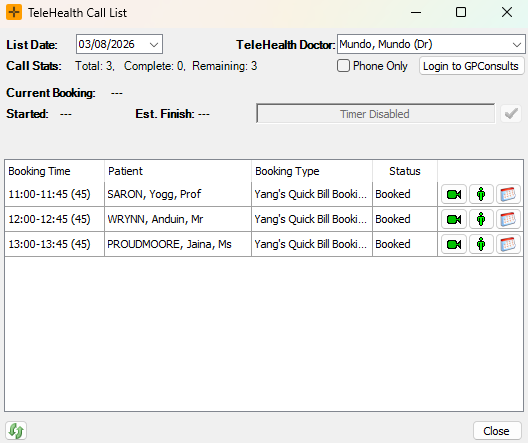
From the menu bar, go to Diary > TeleHealth Call List.
The Telehealth Call List opens showing today's bookings for registered doctors and Telehealth booking types. If the message "Telehealth Consulting Disabled" appears, you are not logged in as a doctor.
Start your session
At the start of each session, click Login to GPConsults. This opens the GP Consults website, where you will sign in using your registered provider details to begin accepting calls.
Make sure to leave the GP Consults website page open. Closing it will prevent Telehealth consults from starting.
Start a consult
- Highlight the patient row in the Telehealth Call List.
- Choose your consult type:
- Video consult: click the camera icon (Start TeleHealth Consultation) to open the GP Consults website connected to the patient.
- Phone consult: select Phone Only in the top right corner. The camera icon changes to a phone icon. Click it to start the call.
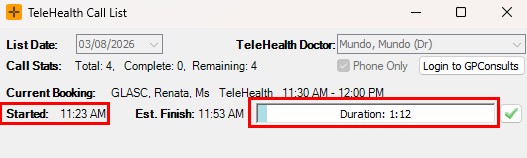
When the consult starts, the booking status changes to "In Session" and the consult start time is recorded. A timer shows the elapsed duration.
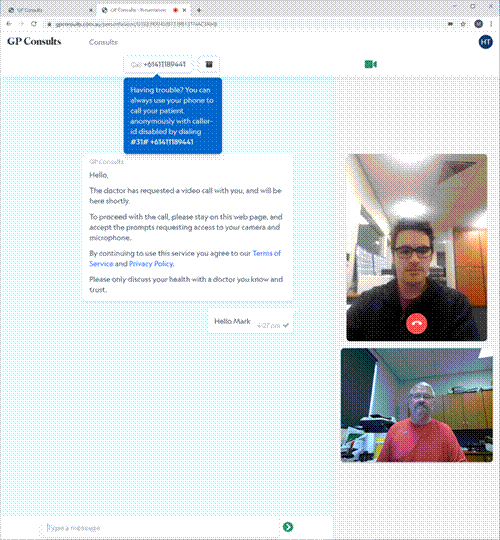
From the GP Consults website, you will need to enter the patient's mobile number when prompted. This will send the SMS to the patient to begin the Telehealth consult.
During the consult
Your web browser opens with the Telehealth consult. The clinician view shows the patient video feed and the consult controls. The video call itself runs in GP Consults, not in HealthTrack. HealthTrack tracks the timing and status only.
Document the consult in the patient's clinical record the same way you would any other booking. There is no separate telehealth note type.
Phone: For phone consults, you will call the patient using your landline/mobile phone. HealthTrack will track the duration and status of the booking.
End a consult
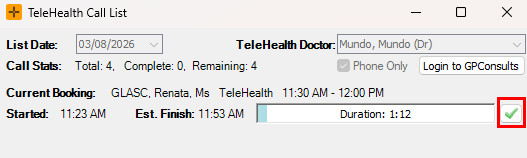
When you are ready to end the call, click the tick button to the right of the consult timer. The booking status changes to "Out Session" and the end time is recorded.
Return to the Telehealth Call List and repeat from Start a consult for the next patient.
Close your session
When all Telehealth consults are complete, close the Telehealth Call List window to end the session.
Common problems
| Symptom | Likely cause | Where to look first |
|---|---|---|
| The booking is not in the Telehealth Call List | Its booking type is not telehealth-enabled | The booking type's telehealth setting in Admin |
| You cannot start a consult | You are not logged in as the doctor, the doctor is not registered for telehealth, or the doctor has no default provider number | The doctor's telehealth registration and default provider number |
| The video will not open | A problem with the GP Consults connection | Check that you are logged into GP Consults and that the GP Consults website page is still open; if it persists, contact support |
| The patient did not get a join link | No mobile number recorded, or a delay on the GP Consults side | The patient's mobile number on the booking |
| "Telehealth Consulting Disabled" message | You are not logged in as a doctor | Log in as the doctor |