
How to add a family member or next of kin
HealthTrack allows you to record important contact details for a patient, including family members or next of kin, ensuring relevant information is easily accessible when needed.
These are two different things in HealthTrack:
- A next of kin is a set of contact details (name, relationship, phone numbers) stored on the patient's own record. It is not a link to another patient record, and the person does not need to be a HealthTrack patient.
- A family member is another HealthTrack patient grouped with this patient onto a shared family account. Family members share the account holder's addresses.
This article covers both.
Add a next of kin
- Select the Additional tab on the patient's Demographic tab.
- Select Edit Patient.
- Enter the Next of Kin / Primary Contact information into the fields displayed.
- Select Save Patient.

HealthTrack keeps one next of kin / primary contact per patient. This single contact also serves as the emergency contact. There is no separate emergency-contact field, so use the Relationship field to describe the person's role.
The Relationship list is configurable for your practice, and you can also enter your own value if the right option is not listed.
Adding a next of kin does not create a patient record or link to one. If the person is also a patient at your practice, their patient record and the next of kin details are entirely separate.
Where next of kin details are used
Next of kin details appear on the patient's record and flow through to a small number of outputs:
- Some reports include the next of kin's name, relationship and phone number.
- Patient questionnaires can prefill next of kin fields from these details.
SMS messages and bulk communications are sent to the patient's own contact numbers. The next of kin's phone number and email are not used as a sending target. If a family member should receive the patient's communications, record that number in the patient's own contact fields.
Add a family member
A family member must already be a patient record in HealthTrack. To group a new family member, add them as a patient first. For the steps, review our article: How to add a new patient.
Family members are patients grouped onto one account. Every family has an account holder, and the account holder's record owns the family's shared addresses, including the invoice address.
- Navigate to the patient's file and go to the 'Demographics' tab.
- Select Edit Patient.
-
Under the 'Address' section, select Other Addresses and Family Members.
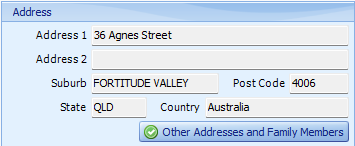
- Select Add Family Member, search for the patient and select them.
- Select Save and Close.
All members of a family share the account holder's addresses. If a family member's address changes, update it once against the family rather than editing each patient separately.
HealthTrack does not record a relationship type (such as parent, child or spouse) between family members. The family is a single group with one account holder. The Relationship field only exists on the next of kin contact.
To change which family member is the account holder, review our article: How to change the account holder.