
Understanding and changing patient status
Every patient record in HealthTrack has a status: Active, Inactive, Contact or Deceased. The status tells your team at a glance whether the person is a current patient of the practice. This article explains what each status means, what the status does and does not change, and how to update it.
The four statuses
| Status | Typical use |
|---|---|
| Active | A current patient of the practice. |
| Inactive | A patient who no longer attends the practice. Their record and full history stay available. |
| Contact | A person whose record is held for reference rather than as a current patient. |
| Deceased | A patient who has passed away. This status records a date of death and has its own follow-up steps. See the article What to do if a patient is deceased. |
How to change a patient's status
- Open the patient and, on the Demographic tab, select Edit Patient at the bottom of the screen.
- In the Status drop-down menu, select the new status.
- Select Save & Close.
- Select Save Patient.
The status can also be updated in the patient editor in HealthTrack Web.
There is no confirmation prompt when you change a status, and the change is fully reversible. If a patient was marked Deceased by mistake, selecting Active, Inactive or Contact clears the recorded date of death when you save.
What the status changes
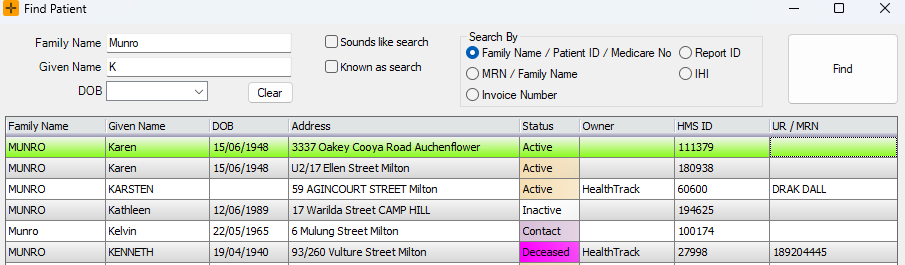
- Row colour. The patient's record and their rows in search results are coloured according to their status. The colours can be changed in your user settings, so they may differ between practices and between users.
- Advanced Search filtering. Advanced Search (Edit > Advanced Search) can filter patients to a single status, which is useful for building a worklist of, for example, all Inactive patients.
- Deceased only: recalls stop. A patient marked Deceased no longer appears on recall due lists. The article What to do if a patient is deceased covers this and the follow-up checklist in detail.
What the status does not change
- Search results. Patients of every status always appear in patient search. The status never hides a patient from the results; it only changes the row colour.
- Bookings and messages. Changing a status does not cancel existing bookings and does not block new ones. If you are closing off a record, review the patient's future bookings and any Patient Connect programs separately.
Patients arriving from hospital feeds
If your practice receives hospital feeds, patient records created by the feed may arrive with the status Contact rather than Active. This is expected: the feed creates a record so that results and correspondence have somewhere to file, without treating the person as a current patient. If one of these people becomes a patient of the practice, update their status to Active using the steps above.
If you want to tidy up feed-created records, use Advanced Search to build a worklist of all patients with the Contact status and review them in one pass.