
Identify Patients Using Advanced Search
The Advanced Search tool helps you find exactly what you need - from simple look-ups to highly specific patient cohorts.
What Advanced Search Can Do
- Quick lookups: Search for a patient using just a phone number.
- Detailed queries: Find, for example, all male patients aged 65–75 who are prescribed Lipitor and enrolled in the Drug Study within a set date range.
You can also combine existing data reports from the Export Data section. For instance, using the Echo Data export, you can search for patients who:
- Have an Ejection Fraction below 50%
- Are female, over 50 years old
Every criterion you enable must be true for a patient to appear in the results. Advanced Search always combines criteria with AND - there is no "any of" option. Each extra criterion narrows the results further, so if your search comes back empty, you have most likely stacked one criterion too many.
How to Use Advanced Search
Navigate to Edit > Advanced Search. The Advanced Search window has five tabs to apply various filters.
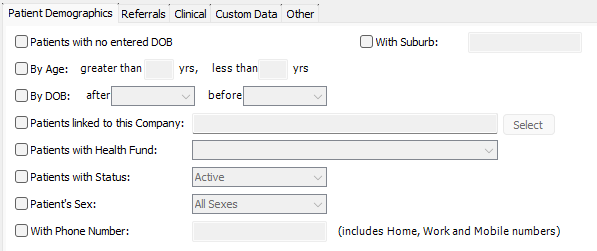
- Patient Demographics:
- Search by core details such as age, sex, health fund, and other basic patient information.
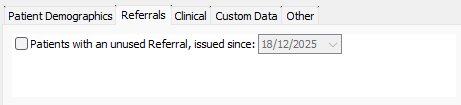
- Referrals:
- Identify patients with an unused referral issued between the current date and a nominated date.
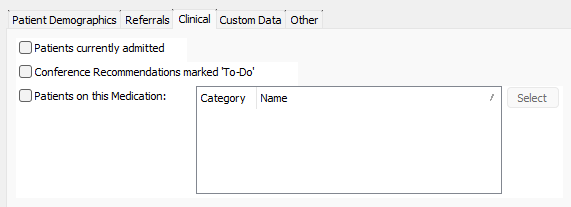
- Clinical:
- Shows anyone with "admitted" status in the Hospital module.
- If you use the Prescribing module, you can search by medication.
The medication search relies on the MIMS drug database. If MIMS is not enabled, or the drug you entered cannot be matched against it, the medication criterion is skipped without any warning and the search runs as if it were not there. If a medication search seems to return every one, check that MIMS is available and the drug name resolves before trusting the list.
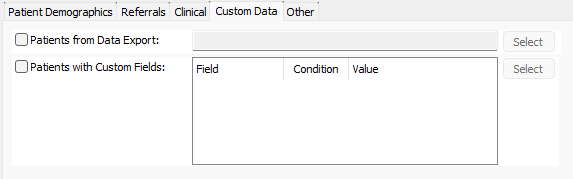
- Custom Data:
- Identify patients based on targeted data exports available in Admin > Export Data.
- Search based on custom fields you've created and assigned to patients.
- Other:
- Enter a list of HealthTrack Patient IDs directly.

Performing a Search
- Apply your filters - for example: Male patients, aged 65–75, prescribed Lipitor.
- Select Perform Search.
- A Patient Worklist appears, showing all patients that match your criteria.
Your criteria are not saved when you close the window. If you plan to reuse a complex search, keep a record of the criteria you applied.
The 1,000-Patient Result Limit
Advanced Search returns at most 1,000 matching patients. Broader matches beyond the first 1,000 are left off the worklist.

This matters most for recall and mail-out campaigns. A broad search can produce a worklist that quietly misses patients, so always sanity-check the worklist size against what you expect. If a search may match more than 1,000 patients, narrow the criteria and run it in batches - for example by suburb, age band or date range - so each batch stays under the limit.
If Your Search Is Not Behaving
| Symptom | Likely cause | What to do |
|---|---|---|
| The search returns no patients | All criteria must match (AND) - one criterion is too strict | Remove criteria one at a time until results return |
| A medication search returns far more patients than expected | The medication criterion was skipped because MIMS is unavailable or the drug did not resolve | Check MIMS is enabled and the drug name matches, then rerun |
| A campaign list seems to be missing patients | The search matched more than 1,000 patients | Narrow the criteria and run the search in batches |
| You want to rerun last week's search | Criteria are not saved between sessions | Rebuild the criteria, or keep a list of Patient IDs to paste into the Other tab |