
How to create and manage group bookings
A group booking is one appointment slot that holds several patients, such as a group therapy session, an antenatal class or an education session. You create the group slot once, then enrol patients into it. Each attendee keeps their own status (booked, arrived, no show and so on), and clinicians work through the attendees one at a time.
A group booking is not a normal booking with extra patients. It is a separate kind of diary entry with its own attendee list, so it will not appear in a normal booking search. Look for it on the diary itself.
Before you start
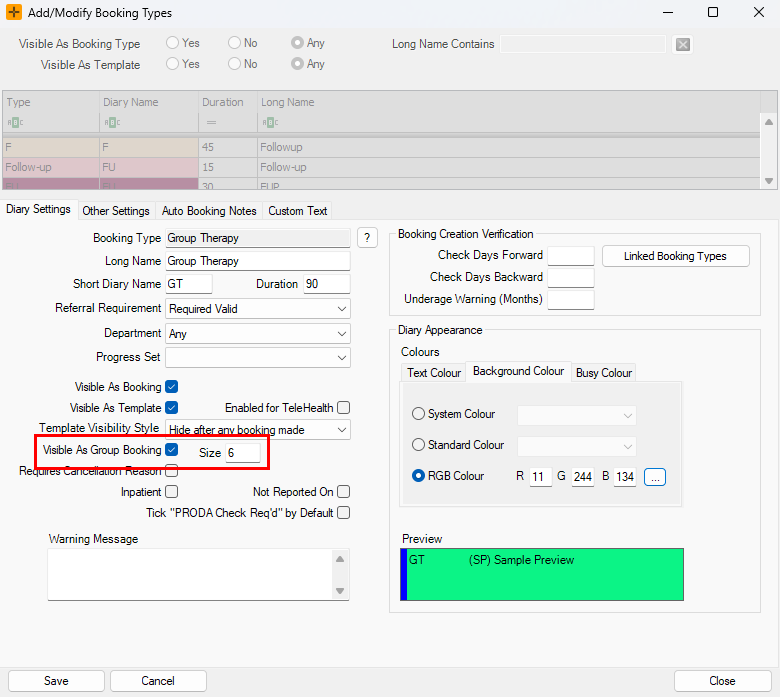
Group bookings are driven by the booking type. A booking type must be set up as a group type, with a default maximum group size, before you can create group slots with it. See How to add Booking Types for booking type setup.
Create a group booking
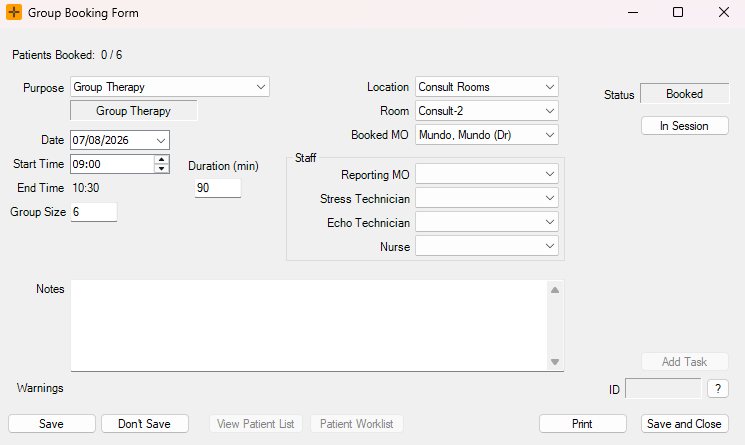
- You should already have group booking diary templates already set up. In the diary, select an available group booking template. HealthTrack opens the group booking form instead of the normal booking form.
- Otherwise, you can change the Default Type at the bottom of the screen to a Group booking type.
- Set the time, location, room and doctor, and any staff for the session.
- Check the maximum group size. It starts from the booking type's default, and you can change it for this slot.
- Save the slot. On the diary it shows as one block with an attendee count, for example 3/10.
You can also create group slots from a diary template, and make a linked recurring series in the same way as other recurring bookings.
Add or remove patients
Enrolment happens on the slot's patient list, not on the main slot form.
- Open the group slot from the diary.
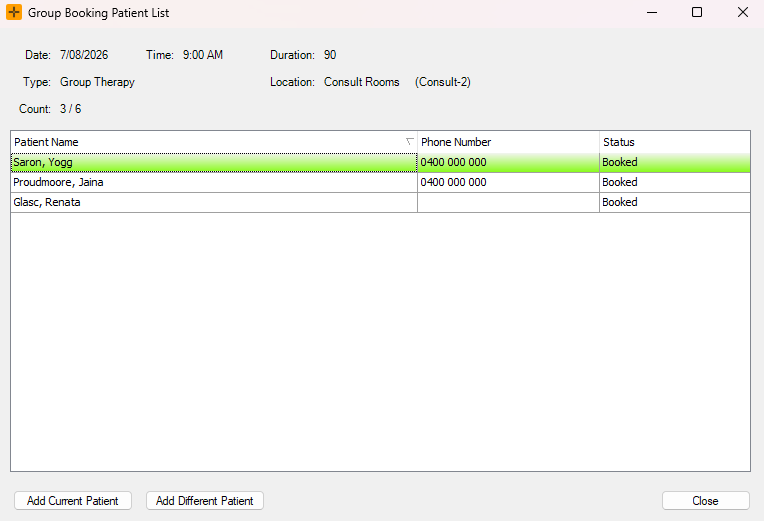
- Open the patient list with View Patient List.
- Add patients by searching for them, or add the patient you currently have open. A patient can only be enrolled once in each slot.
- To take a patient off the list, remove them from the patient list. There is no undo for a removal, so if you remove the wrong patient, add them back to the list.
For a linked recurring series, the series editor can enrol or remove a patient across all the linked sessions at once.
How capacity works
The diary shows each group slot as a count, for example 3/10, and marks the slot as full when the count reaches the maximum.
The maximum group size is a label, not a limit. HealthTrack does not stop you enrolling past the maximum, so check the count before you add a patient to a session that looks full. The count includes everyone except cancelled attendees.
The find the next available Booking search does respect the maximum: when it looks for the next available group session it only offers slots that still have room.
Two levels of status
A group booking has two separate kinds of status:
- The slot's status covers the session as a whole, and works like the status on a normal booking.
- Each attendee's status is set per patient on the patient list, so you can mark one patient as arrived and another as a no show in the same session.
These are independent. Changing the slot's status does not change any attendee's status, and one attendee's status does not affect the others. Setting an attendee's status to cancelled takes them out of the attendee count but keeps their row on the list, which is useful when you want a record that they were enrolled and pulled out.
For the statuses themselves, see How to change the Booking Status.
Work through the attendees
There is no single shared record for the whole group. The slot's patient worklist opens all the enrolled patients so the clinician can handle each one individually, and billing is per patient too.
Cancel a session or an attendee
- One attendee: either remove them from the patient list, or set their status to cancelled if you want to keep the row.
- The whole session: delete the group slot from the diary.
- A recurring series: when you delete a slot that is part of a linked series, HealthTrack asks whether to cancel this session only or all the linked sessions.
Common questions
| What you see | What is going on |
|---|---|
| A group booking does not come up in a booking search | Group bookings are not normal bookings. Find the slot on the diary. |
| More patients enrolled than the maximum | The maximum is a label and is not enforced. Check the count before enrolling. |
| The slot status and an attendee's status do not match | They are separate. Set each one where it applies. |
| A cancelled attendee is still on the list | Cancelling keeps the row but removes them from the count. |